命名空间允许在具有一组隔离资源的逻辑段上划分 Kubernetes 集群。此机制允许在一个集群中创建多租户环境,从而使多个团队能够使用一个基础架构。
同时,它也引发了对集群资源的细粒度访问问题。
在本文中,我将演示如何使用授权令牌授予用户对特定命名空间的访问权限,并使用基于角色的访问控制(RBAC)策略定义其权限。
要在 Kubernetes 命名空间中创建用户并授予他们访问特定资源的权限,您首先在所需的命名空间中创建一个 ServiceAccount。此 ServiceAccount 充当在 Kubernetes 中运行的应用程序或服务的“用户”。接下来,定义一个 ClusterRole,用于指定要授予的权限,例如对 Pod、服务和其他资源的访问权限。尽管集群角色是集群范围的,但您可以通过在特定命名空间中创建 RoleBinding,并将 ClusterRole 链接到 ServiceAccount,从而将权限范围限定为特定命名空间。此设置可确保 ServiceAccount 仅在指定的命名空间中具有必要的权限,从而有效地创建具有特定资源访问权限的命名空间范围的用户。
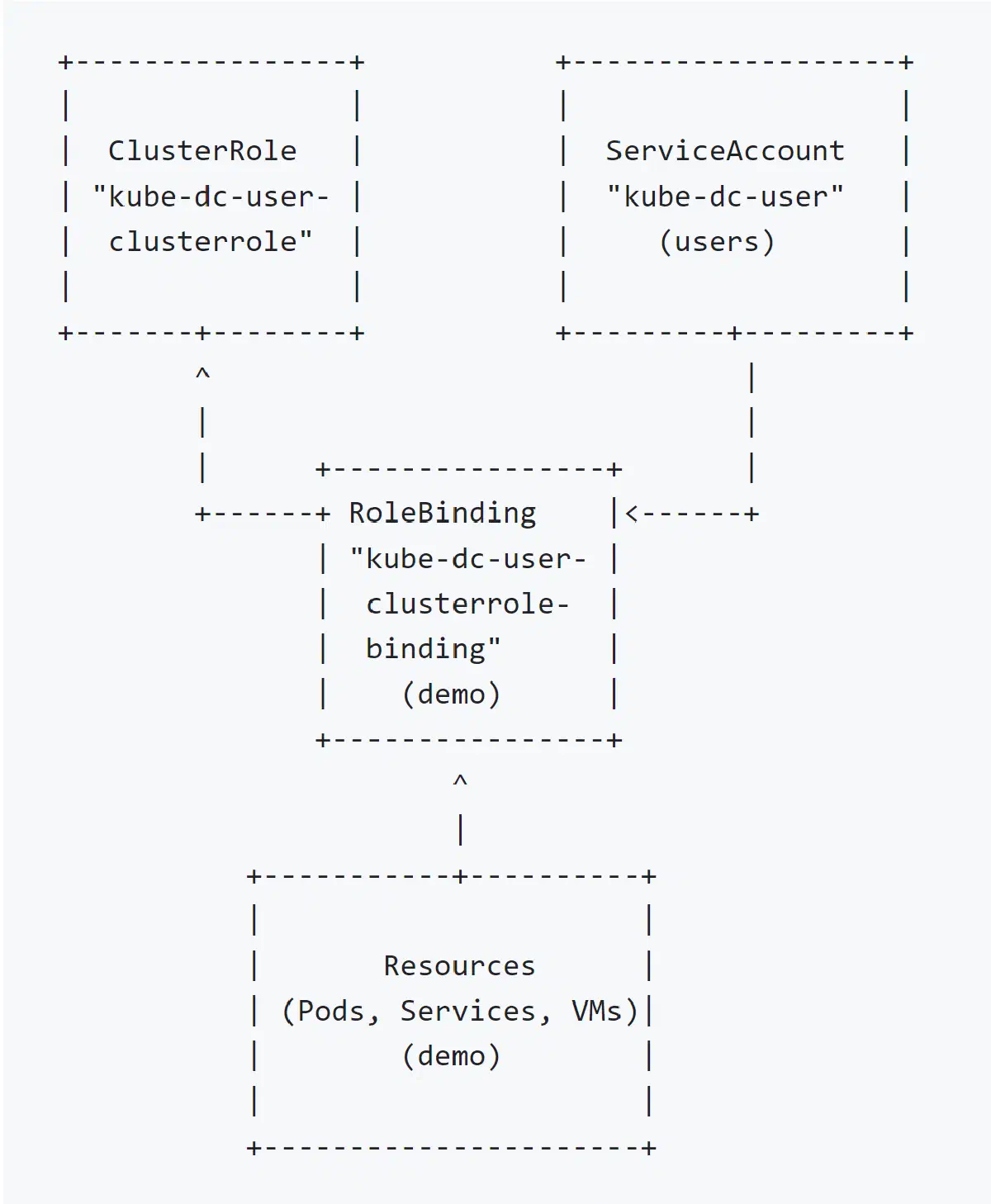
定义一个 ClusterRole,其中包含要授予的权限。此群集角色不指定命名空间,因为它设计为适用于群集范围。
 1
 2
 3
 4
 5
 6
 7
 8
 9
10
11
12
13
14
15
| apiVersion: rbac.authorization.k8s.io/v1
kind: ClusterRole
metadata:
name: kube-dc-user-clusterrole
rules:
- apiGroups:
- '*'
resources:
- '*'
verbs:
- '*'
- nonResourceURLs:
- '*'
verbs:
- '*'
|
用户应保留在永久命名空间 users 中,并通过在特定命名空间中设置 RoleBinding 来授予对特定命名空间的访问权限:
1
2
3
4
| apiVersion: v1
kind: Namespace
metadata:
name: users
|
1
2
3
4
5
| apiVersion: v1
kind: ServiceAccount
metadata:
name: kube-dc-user
namespace: users
|
此外,还应创建一个 Secret:
1
2
3
4
5
6
7
8
| apiVersion: v1
kind: Secret
metadata:
name: kube-dc-user-token
namespace: users
annotations:
kubernetes.io/service-account.name: "kube-dc-user"
type: kubernetes.io/service-account-token
|
 1
 2
 3
 4
 5
 6
 7
 8
 9
10
11
12
13
| apiVersion: rbac.authorization.k8s.io/v1
kind: RoleBinding
metadata:
name: kube-dc-user-clusterrole-binding
namespace: flink
subjects:
- kind: ServiceAccount
name: kube-dc-user
namespace: users
roleRef:
kind: ClusterRole
name: kube-dc-user-clusterrole
apiGroup: rbac.authorization.k8s.io
|
创建的令牌名称带有后缀 -token 添加到现有用户:
从令牌创建 kubeconfig
1
2
3
4
5
6
| APISERVER=$(kubectl config view --minify -o jsonpath='{.clusters[0].cluster.server}')
CLUSTER_NAME=$(kubectl config view --minify -o jsonpath='{.clusters[0].name}')
# 获取 CA 证书
kubectl get secret kube-dc-user-token -n flink -o jsonpath='{.data.ca\.crt}' | base64 --decode > ca.crt
TOKEN=$(kubectl get secret kube-dc-user-token -n users -o=jsonpath='{.data.token}' | base64) --decode)
|
创建一个 kubeconfig 文件。
下面是在 kubeconfig 中添加新用户、上下文和集群的示例。您可能希望将其添加到现有的 kubeconfig 文件中,或者专门为此目的创建一个新文件。将变量替换为之前创建的变量
 1
 2
 3
 4
 5
 6
 7
 8
 9
10
11
12
13
14
15
16
17
18
| apiVersion: v1
kind: Config
clusters:
- name: ${CLUSTER_NAME}
cluster:
certificate-authority: ./ca.crt # Adjust the path as needed
server: ${APISERVER} # Use the APISERVER variable
users:
- name: kube-dc-user
user:
token: ${TOKEN}
contexts:
- name: kube-dc-user@${CLUSTER_NAME}
context:
cluster: ${CLUSTER_NAME}
namespace: flink # Specify the namespace if desired
user: kube-dc-user
current-context: kube-dc-user@${CLUSTER_NAME}
|
https://www.cnblogs.com/winstom/p/15159343.html
https://shalb.com/devops-methods-practices/how-to-grant-user-access-to-particular-namespace/